Three Products – One Solution
- Advanced video editing and HD movie creation
- Reliable backup and easy recovery
- Industry leading CD, DVD and Blu-ray Disc burning and copying
The Ultimate 3-in-1 Multimedia Suite for Video Editing, Burning and Backup
Nero Multimedia Suite 10 excels your multimedia power with a collection of three products bundled into one powerful suite. It’s loaded with advanced video editing features, media organizer and player, superior burning software, reliable backup technology, and special multimedia tools to enhance your music, photos and videos.
Highlights:
Video Editing with Nero Vision Xtra™
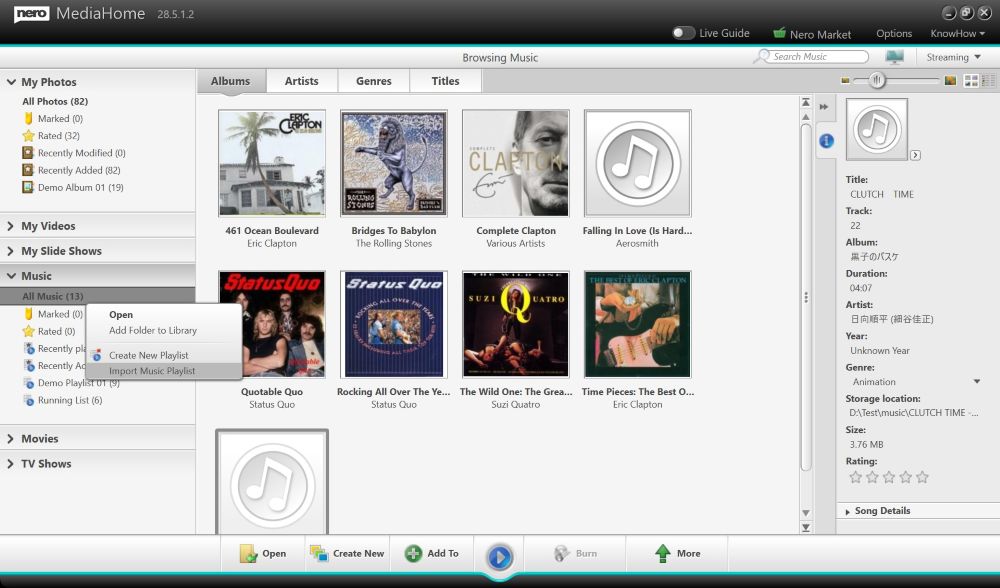
- Search quickly, play back and easily arrange all your music, photos and videos all in one place
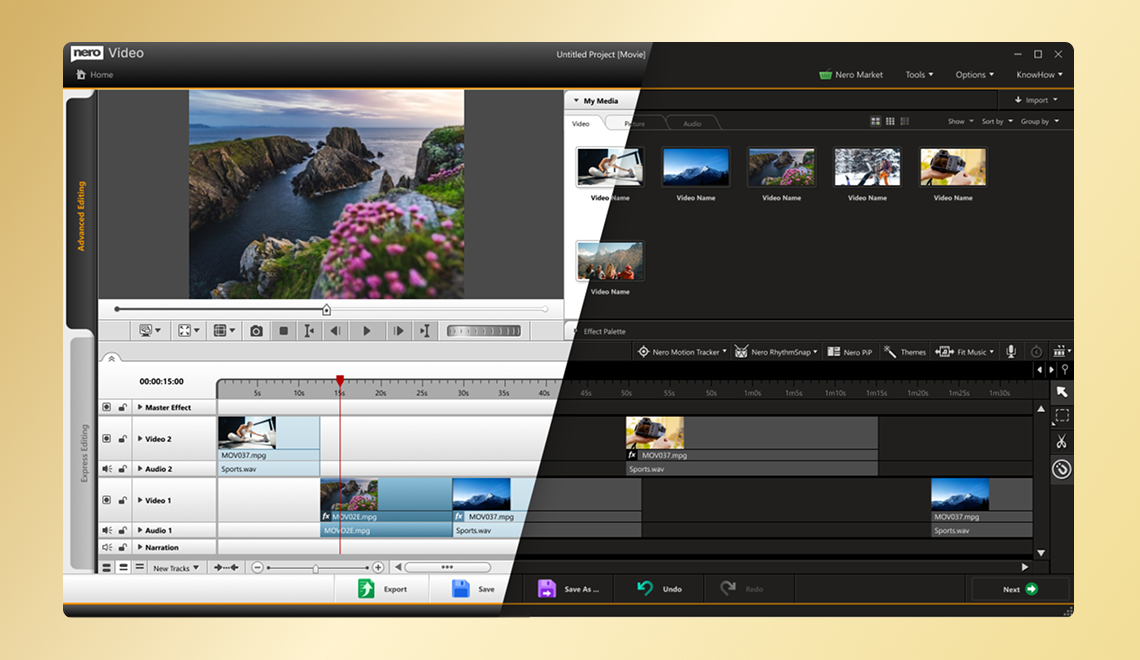
- Utilize cutting-edge video editing tools (picture-in-picture, full keyframe control, master effect track and assorted special effects and transitions) in a true multi-track timeline to achieve advanced personal touches
- Create High Definition DVD, and Blu-ray Disc movies using SmartEncoding for faster HD video output, and author Blu-ray Discs with 24 progressive frame high-quality cinema-style format
- Media player for all most popular audio, video and photo formats such as AVCHD, MKV, FLV, FLAC, DVD, MPEG-4 AVC, (S)-VCD, AVCREC and Audio CDs, plus music playlists and slideshows
- Burn music, photos and videos to CDs, DVDs, and Blu-ray Discs, or share to social communities


Burning with Nero Burning ROM™
- Ensure your discs are readable regardless of scratches, age, or deterioration with SecurDisc technology
- Drag and drop files to burn and copy to CDs, DVDs and Blu-ray Discs or save disc images
- Split oversized files to burn onto multiple discs
- Add extra security protection to your data by adding personal passwords and encryption
- Experience superior playback quality from your burned content
- Make flawless copies of your discs with reliable, uninterrupted burns
Backup with Nero BackItUp & Burn™
- One-click Autobackup without reconfiguring computer settings
- SecurDisc technology – Ensure data readability, increase the chance of retrieving your files, protect your data from unintended alterations, and verify the originator of the data
- Easily back up data to hard drive, CD, DVD, Blu-ray Disc, FTP, memory card and online storage
- Restore personal data after a computer crash or accident
- Recover deleted and damaged files from hard drives, CDs, DVDs, flash storage and floppy discs
- Back up files and folders to multiple devices at once
The Ultimate 3-in-1 Multimedia Suite for Video Editing, Burning and Backup
Arrange Photos and Videos for High Quality Slideshows and Movies
Easily arrange and edit photos and videos in the storyboard, and personalize with Movie Themes.
Edit and Enhance Photos with Just One Click
Easily modify photos to achieve superb picture quality for your personal slideshow or movie projects.
Multi-track Video Editing with Complete Keyframe Handling Option
Use multiple video graphics and audio tracks for true multi-track editing. Apply Picture-in-Picture effects, animate video, audio and overlay effects, and correct values dynamically by setting Keyframe properties.
Burn to Disc or Share to Social Communities, Slide-shows and Movies with Unique Premium Menus
Add menus to your slideshow projects and burn to DVD, AVCHD or Blu-ray Disc. Or choose the Advanced Authoring option to send your project straight to Nero Vision for advanced editing and authoring.
Quick, Easy, and Secure Disc Burning
Drag and drop to burn to CDs, DVDs and Blu-ray Discs, hard drives, networks, and USB devices, and burn oversized files onto multiple discs. SecurDisc technology ensures data readability and offers password protection, encryptions and more.
Fully Controllable, Effective Backup in a Few Easy Steps
Fully customize your backup method, whether it’s easy one-click Autobackup, incremental, differential, full or update backup, then back up select files, entire systems or to multiple devices at once.
Awards
ComputerBild, GermanyComputerBild selects Nero for “Golden Download 2010"
Nero was named the “Golden Download 2010” in ComputerBild’s vote for the best program of the year. With 46.8% of the vote, Nero won the CD & DVD category.
ComputerBild, June 2010
Nero Multimedia Suite 10 earns recognition from PC Plus
The editors of PC Plus magazine recently awarded Nero Multimedia Suite 10 the PC Plus Value Award plus gave the suite four stars in the PC Plus Verdict.
“Nero is an impressive set of tools for a reasonable price.”
PC Plus, June 2010

Double recognition for Nero Multimedia Suite 10 from PCtipp
PCtipp magazine recently gave Nero Multimedia Suite 10 a “Good” rating. Additionally, the Swiss magazine awarded Nero Multimedia Suite 10 with the “PCtipp Purchase Tip” for June 2010. The editors state, “Nero Multimedia Suite 10 offers a wide range and includes everything that the multimedia heart desires.”
PCtipp, June 2010

PC Praxis awards Nero Multimedia Suite 10 a “Good” test result
PC Praxis recently awarded Nero Multimedia Suite 10 with a “Good” mark. The editors state, “Nero Multimedia Suite 10 is sleeker and more high-performance than previous versions and still offers a range of exciting innovations. The combination of applications is successful and offers a lot for the money.”
PC Praxis, June 2010
Nero Multimedia Suite 10 received 5 stars
Windows news tested Nero Multimedia Suite 10 and gave it 5 stars. This article not only praised the “leading role when it comes to burning” but also the comprehensive multimedia functions.
“A suite that offers more? That doesn’t exist,” says Pierre-Édouard Laurent.
Windows news, June 2010

Nero Multimedia Suite 10 Recommended from What Digital Camera
Nero Multimedia Suite 10 received an 89% rating as well as the “Recommended” award from UK’s What Digital Camera magazine.
“Very easy to use, clean interface“
What Digital Camera, June 2010

Nero Multimedia Suite 10 recommended by PC Actual
Nero Multimedia Suite 10 received a global grade of 9.2 and a grade of 8.9 for price quality in the May issue of Spain’s PC Actual magazine.
The editors highlight the data and video editing, conversion and burning, photo features, and backup features.
PC Actual, May 2010
Nero Multimedia Suite 10 awarded from Gazet van Antwerpen
Nero Multimedia Suite 10 was awarded with an overall rating of 4 out of 5 stars by the Belgian magazine Gazet van Antwerpen.
“Get started with media - Nero MultiMedia Suite 10: all tools in one pack.“
Gazet van Antwerpen, May 2010
Nero Multimedia Suite 10 Awarded “5 star” from Computeractive (UK)
“Nero Multimedia Suite 10 includes every tool you need to edit, save and protect the photos, videos, music and PC files that are most important to you.
Nero Multimedia Suite 10 was designed by asking 150,000 users what they wanted from the software – the result is all the key tools are found in just three easy-to-use programs.”
Computeractive, May 2010

Nero Multimedia Suite 10 awarded 4 stars from E-MEDIA
The Austrian magazine E-MEDIA awarded Nero Multimedia Suite 10 the “E-MEDIA Tested” distinction along with four out of five stars saying, “The latest Nero suite is clearly faster and some parts have also become easier.”
E-MEDIA, April 2010

Nero Multimedia Suite 10 Won COMPUTER HOY's Comparative Test
Nero Multimedia Suite 10 was awarded the quality logo and an overall rating of 8.5 out of 10 points by the Spanish COMPUTER HOY magazine.
The editor pointed out the excellent multimedia functions, file and disc compatibilities, and the advanced backup software.
Computer Hoy, April 2010

Nero Multimedia Suite 10 Awarded “Editors' Choice” by DijitalMagazin.net
Nero Multimedia Suite 10 has received an Editors' Choice Award from the Turkish website DijitalMagazin.net.
DijitalMagazin.net, April 2010

Nero Multimedia Suite 10 is a Myce.com Editors Choice
"Nero did a very good job of making a suite that demands a place on your hard drive, and it also offers lots of goods in return. We believe that this multimedia suite is one of the best you can get."
Myce.com, April 2010
Nero Multimedia Suite 10 receives 5-star award from SoftwareCrew (UK)!
“Nero Vision has also seen a major leap forward: if you like to get creative with video, then you’ll love its new multi-track editing, good range of filters and effects, and (assuming you’ve compatible graphics hardware) CUDA support", says Mike Williams.
SoftwareCrew, UK, April 2010
The Ultimate 3-in-1 Multimedia Suite for Video Editing, Burning and Backup
| Nero Vision Xtra™ | |
| |
| | |
| Nero Burning ROM™ | |
| |
| | |
| Nero BackItUp & Burn™ | |
| |
| | |
| Nero Multimedia Tools | |
| |
Compare Your Current Version to Nero Multimedia Suite 10
Still using a previous version of Nero or a version you received with a PC or CD/DVD burner? Compare what you can do when you upgrade to Nero Multimedia Suite 10, the latest version of the world’s best-selling digital media suite.
Nero Multimedia Suite 10 brings you all the combined digital media features and tools of three products into one comprehensive suite to create projects quickly and easily with professional-style results. The following chart shows you how your version of Nero compares with Nero Multimedia Suite 10.
Achieve more from your digital media content with the easy to advanced features of Nero Multimedia Suite 10.
Included
Limited functionality or not always included
TrialSupported Operating Systems
Nero Multimedia Suite 10 Nero 9 Nero 9 Essentials Nero 8 Nero 8 Essentials Nero 7 Nero 6 Compatible with Windows® XP 


Optimized for Windows Vista® 


Compatible with Windows® 7 


Nero Knowledge Center
Nero Multimedia Suite 10 Nero 9 Nero 9 Essentials Nero 8 Nero 8 Essentials Nero 7 Nero 6 Integrated Nero StartSmart™ access to online step-by-step tutorials and manuals 
Network with My Nero community, share blogs and tips with other Nero users 
Direct access to available add-ons and updates 
Media Organizer
Nero Multimedia Suite 10 Nero 9 Nero 9 Essentials Nero 8 Nero 8 Essentials Nero 7 Nero 6 One-stop organization for photos, music and videos 
Favorite photo-tagging for easy sort and search 
Speed search to easily locate music, photos or videos 
Stack View and sortable media library for easier browsing 
Zoom library viewing 
Easily create playlists of songs 


Automatically retrieve all music information via Gracenote (album art,title, artist, year, etc.) 


Display Window for music data information while playing back music 


Import from Windows® 7 libraries, and user selected devices, folders and drives 
Playback Music, Video, Photo
Nero Multimedia Suite 10 Nero 9 Nero 9 Essentials Nero 8 Nero 8 Essentials Nero 7 Nero 6 Play back video, photo and music files and discs 


Play back music or disc in Windows® 7 Thumbnail Toolbar 
High Quality MP3 Pro and MP3 Surround Encoding 


Play 'FLAC Lossless Audio' and AIF file formats for best audio quality 


Play back Audio CDs 


Play back MP3s (non DRM) songs 


Play back WMA (non DRM) songs 


Play AVCHD, AVC h.264, AVCREC, Matroska, Flash Video , MPEG 2, MPEG4, DivX, Xvid and more 


Play commercial Hollywood DVD-Videos with Dolby® Digital 2 channel sound 


Play commercial Hollywood DVD-Videos with Dolby® Digital Surround Sound up to 5.1 channels 


Easy Create & Edit Video, Photo Slideshows
Nero Multimedia Suite 10 Nero 9 Nero 9 Essentials Nero 8 Nero 8 Essentials Nero 7 Nero 6 View & browse digital camera photos 

Play instant slideshows from tagged photos or videos 
Enhance and modify digital photos with one click powerful filters 

Crop photos with one click 
Undo specific layers in your edit history 
Arrange your photos and videos for slideshow setup in a storyboard 
Trim and edit photos and videos with the slideshow creator 
Create photo slideshows, video slideshows or mix photos and videos in a slideshow 
Apply one-click Themes to slide shows 

Create DVDs or Blu-ray Disc videos with one click 
Publish slideshow to online communities with one click 

Advanced Video Editing
Nero Multimedia Suite 10 Nero 9 Nero 9 Essentials Nero 8 Nero 8 Essentials Nero 7 Nero 6 Fine-tune projects started in Nero MediaHub with the ultimate creative touch in Nero Vision 
Organize and diretly import footage using Nero MediaHub library 
Advanced Multitrack Video Editor with full Effect and Keyframe Control 
Create multiple video and audio tracks for true multitrack editing 
Advanced Video Overlay Handling - e.g.: Video Overlay, PiP, Chroma Key, Position, Scale, Rotation 
Advanced Video Effects - e.g. Pan & Zoom, Chroma Key, Image Matt, Lens Distortion, Sharpen, Edge Feathering, Earthquake and more 
Complete Keyframe Handling for dynamic animation and editing of video effects 
Apply effects to entire project with master effect track (e.g. old film, sepia, indiviudal film color, etc.) 
AVC NVIDIA® CUDA™ support for AVCHD output (encoding with GPU-Computing) 
Boost quality of standard SD clips to HD resolution 

Remove background noise for improved audio quality (e.g. of shot material with camcorder mike) 
Apply Audio Rubberbanding and waveform dispaly for fine tuning audio volume 
Import and edit High Definition video (eg.from an AVCHD camcorder) 


Automatic scanning of DV or HDV video tape to capture only wanted scenes 

Capture from analog devices like VHS, SVHS, Video 8, Hi8 (compatible capture card required) 


Automatically extract the music from recorded TV shows and export to MP3 

Easily detect and remove commercials from TV recordings 

Apply high quality MovieThemes with 2D and 3D scenery effects, titles, credit screens, and seamless audio tracks to your movies 


Advanced Video Authoring
Nero Multimedia Suite 10 Nero 9 Nero 9 Essentials Nero 8 Nero 8 Essentials Nero 7 Nero 6 Fully integrated preview and content screen for easy asset organizing 


Create DVD-Video discs from various video files for playback on all standard DVD Players 


Individually customize and link menus 

Author & burn High Definition video (eg.from an AVCHD camcorder) 


Supports 24p authoring for highest quality Blu-ray video 
Create High Definition Blu-ray discs with high quality animated menus (Blu-ray Disc Authoring Plug-in included) 

Smart Encoding for MPEG 2 to DVD-Video, MPEG 2 HD and AVCHD to Blu-ray Disc, and AVCHD to High Definition DVD Disc 

High quality Menu TemplatePacks for creating abstract, 2D and 3D Hollywood style DVD video menues (for DVD/AVCHD/Blu-ray Disc) 

Export to flash media devices high definition movies in AVCHD format for highest quality playback without an optical drive 

Import PowerPoint® presentations and convert to DVD-Video or Blu-ray Disc for TV playback 


Supplement DVD or BD-Video discs with a 5.1 Dolby Digital Surround Sound 


Publish video projects to online social communities 

Multimedia Tools
Nero Multimedia Suite 10 Nero 9 Nero 9 Essentials Nero 8 Nero 8 Essentials Nero 7 Nero 6 Create custom CD and DVD covers and labels 


Digitize music from vinyl records and cassette tapes to PC 


Quickly and easily edit digital music files 


Professionally edit and mix audio projects 


Support for VST audio plug-ins for more audio effect choices 


Create 5.1 surround sound mixes for your video projects 


Compress dual layer DVD video to single layer standard DVD and burn to disc 


Convert digital music into desired formats 


Convert videos to mobile devices (PSP, iPod, etc) 


PC performance monitoring and optimization tools 


Backup, Recover
Nero Multimedia Suite 10 Nero 9 Nero 9 Essentials Nero 8 Nero 8 Essentials Nero 7 Nero 6 Back up and restore files, folders, drives and entire system in a few easy steps 


Auto backup of important files to hard drive, removable media or online 


One-click automatic backups 
Schedule backups with various methods, compression and encryption levels 


Search within a backup and collect files to restore in one step 
Restore former versions of saved files 


Recover damaged or deleted files from hard drives, CDs, DVDs, flash storage and floppy discs 


Sync files and folders to a variety of storage media for easy access to the latest versions 
Burning, Copying
Nero Multimedia Suite 10 Nero 9 Nero 9 Essentials Nero 8 Nero 8 Essentials Nero 7 Nero 6 Copy CDs and DVDs 


Copy Blu-ray Discs 


Burn CDs and DVDs 


Burn Blu-ray Discs 


Windows® desktop gadget for one click disc copy and disc image burning 


SecurDisc - Increase the lifespan and reliability of burned discs 


Password protection for files and folders 

Span oversized backups over multiple CDs, DVDs or Blu-ray Discs in any combination 
Windows® context menu support 
Display burning progress in Windows® 7 status bar 
Windows® 7 Jump List access 
Rip and/or transcode to AIFF 


Burn large amounts of data to Blu-ray Discs 


Copy and compress non-copy protected DVD-Videos to fit on smaller target media 


Burn discs from downloaded disc images 


Automated Audio-CD ripping into desired formats 


Automatically convert MP3s to Audio-CD format 


Included
Limited functionality or not always included
Trial2) Specific information about VAT and shipping fees can be found in the Shopping Cart.